Category: API & Policy

Discover API & Policy practical guides, expert insights, and proven strategies on essential features and best practices. Learn how to use tools more effectively, improve workflows, and API & Policy apply industry standards to achieve better results.

  • WhatsApp Message Broadcasting Limitations That Block Your Growth

    WhatsApp Message Broadcasting Limitations That Block Your Growth

    Your WhatsApp broadcasts aren’t reaching everyone on your list. The platform has strict limits that vary wildly based on which version you use. Know these rules now or watch your customer reach shrink when you need it most.

    What WhatsApp Message Broadcasting Limitations Are

    WhatsApp message broadcasting limitations are daily caps on how many customers you can message. The rules depend on whether you use the Business App or Business API. These aren’t suggestions—they’re hard stops that block your messages once you hit them.

    Why These Limits Matter for Your Marketing

    The wrong platform choice can kill your growth plans. If you’re unsure whether the Business App or API is right for scaling, this guide breaks it down clearly: WhatsApp Business API: Features, Limits, and Scaling Explained.

    WhatsApp Business App users can broadcast to only 256 contacts at a time, and recipients must have saved the sender’s number. That means if you have 1,000 customers but only 200 saved your number, your broadcast reaches just those 200.

    Stacked tiered blocks showing shared WhatsApp portfolio limits

    The API tells a different story. The WhatsApp Business API uses a tier-based system starting at 1,000 daily unique contacts, scaling up to unlimited messaging depending on business reputation. But here’s the catch: as of October 7, 2025, WhatsApp applies messaging limits across the entire business portfolio instead of per phone number.

    This change means adding more phone numbers won’t expand your reach. Your whole business shares one daily allowance.
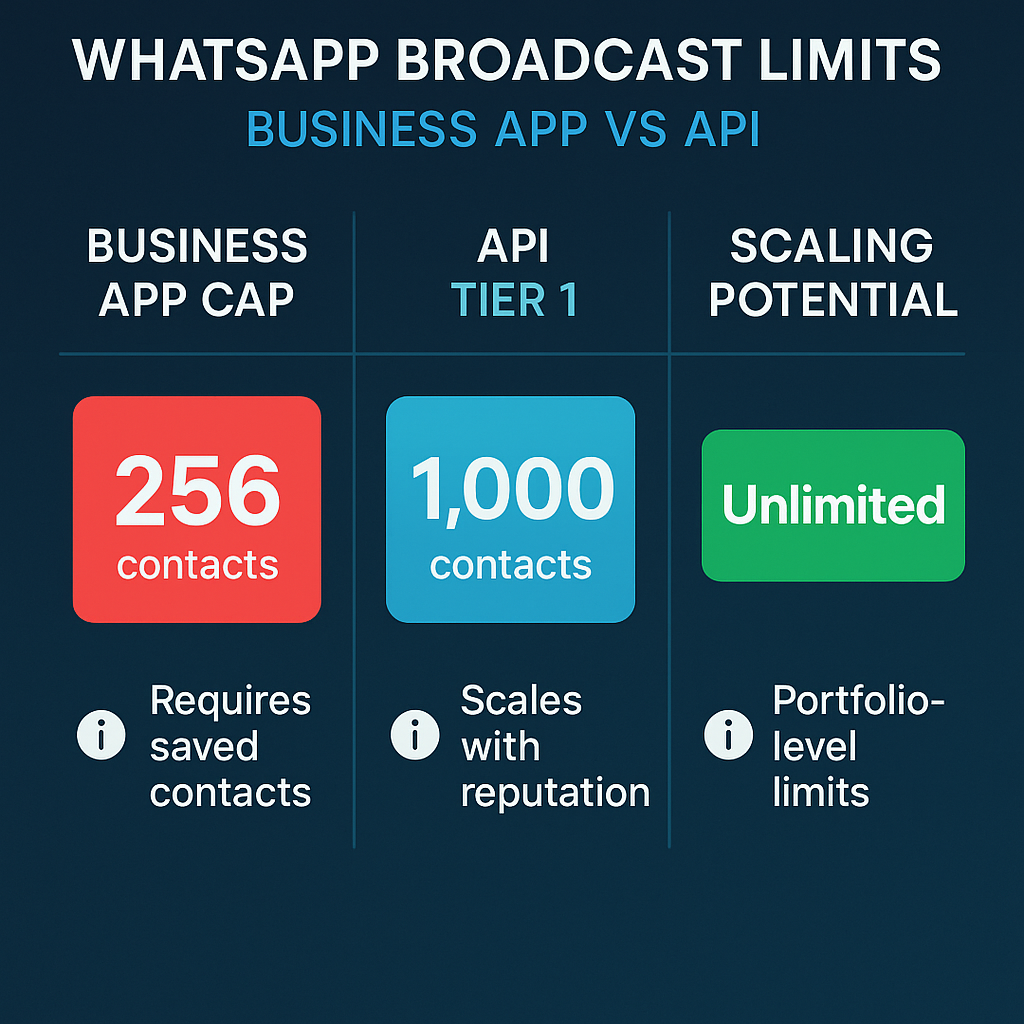
    Infographic comparing WhatsApp Business App 256-contact limit versus API tiered scaling system

    How to Navigate WhatsApp Broadcasting Limits

    Audit your current setup first. Check if you use the Business App or API. Write down your daily message limit. The App gives you 256 contacts per broadcast list. The API starts at 1,000 daily contacts for Tier 1, with higher tiers reaching 10,000, 100,000, or unlimited based on your reputation. If you’re planning to upgrade or already using the API, understanding how WhatsApp Business API works end-to-end is critical: Mastering WhatsApp Business API for Scalable Messaging.

    Clean your contact lists ruthlessly. Remove contacts who haven’t saved your number if you use the App. For API users, remove contacts who haven’t engaged in 90 days. Quality beats quantity when WhatsApp judges your messaging reputation.

    Track your engagement weekly. Monitor block rates, reply rates, and delivery rates. Poor performance shrinks your daily allowance. Good engagement opens the door to higher tiers with more reach.

    Abstract navigational waypoints through WhatsApp broadcasting constraint layers

    Metrics That Signal Broadcasting Health

    Watch your delivery rate closely. If messages aren’t reaching contacts, check if they saved your number (App users) or if you’ve hit your daily limit.

    Monitor your block rate every week. High blocks tell WhatsApp your messages aren’t welcome. This can lower your daily allowance or keep you stuck in lower API tiers.

    Track reply rates as a quality signal. The first tier increase starts from 2,000 outgoing messages per day, and limit reviews occur every 6 hours. Engaged customers help you climb faster.

    Check your messaging tier monthly if you use the API. Messaging limits for WhatsApp Business API are tiered: Sandbox at 250 unique customers per 24 hours, Tier 1 at 1,000, Tier 2 at 10,000, Tier 3 at 100,000, and Tier 4 offers unlimited conversations with good reputation.

    Watch for verification opportunities. Verified businesses start with higher template limits, giving you more room to grow from day one.
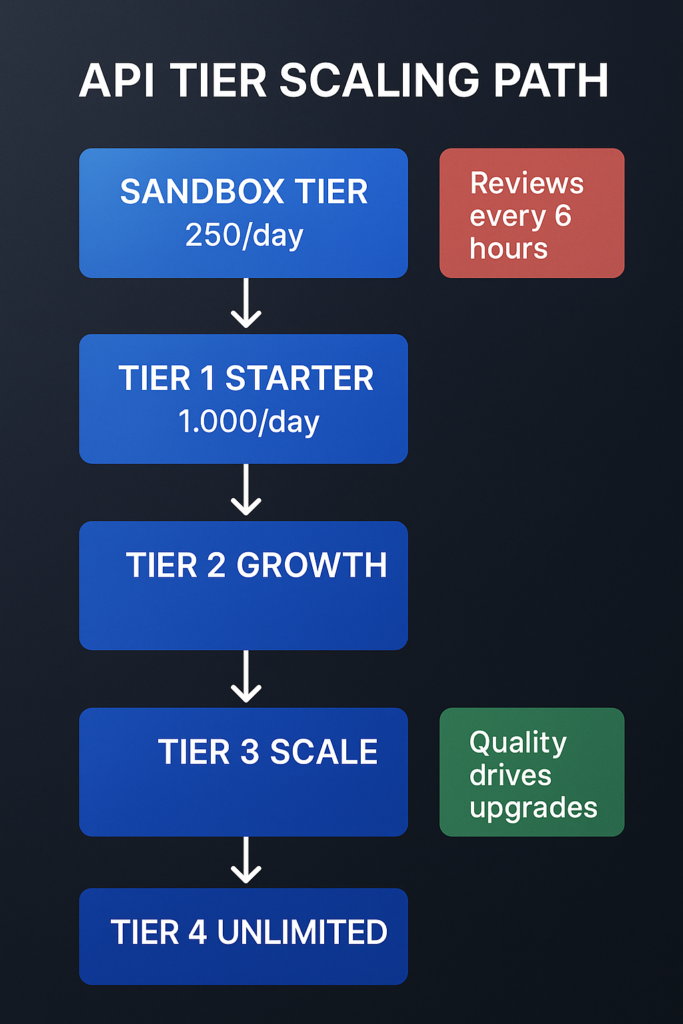
    Infographic showing WhatsApp Business API tier system from Sandbox to unlimited messaging levels

    Safeguards to Protect Your Broadcasting Rights

    Never buy contact lists or send to random numbers. WhatsApp tracks unsolicited messages and punishes senders with lower limits or account restrictions.

    Test your broadcasts with small groups first. Send to 50-100 engaged contacts before rolling out to your full list. This helps you spot problems before they hurt your reputation.

    Keep your messaging relevant and valuable. Generic promotions get blocked. Personal, helpful messages get replies. WhatsApp rewards engagement with higher limits.

    Interlocking geometric safeguard shields protecting WhatsApp broadcast rights

    The Cost of Waiting

    Your competitors who understand these limits are already optimizing their WhatsApp strategy. They’re building engaged contact lists, climbing API tiers, and reaching more customers each month.

    New business portfolios start with a 250-message limit, which can be increased through a scaling path to 2,000, then 10,000 and beyond. But this growth requires consistent quality messaging and customer engagement.

    Every poor broadcast you send now makes climbing harder later. Every month you stay on the Business App instead of upgrading to the API is a month of capped growth at 256 contacts.

    Stylized hourglass with tiered capacity blocks showing delay

    Start by checking your current WhatsApp setup and daily limits. Your broadcasting reach depends on understanding these rules and playing by them. The businesses that scale their WhatsApp messaging are the ones that respect the platform’s limits while optimizing within them.

    FAQs
    What’s the difference between WhatsApp Business App and API broadcast limits?

    Business App: 256 contacts max, only saved contacts. API: Starts at 1,000, scales to unlimited based on engagement and reputation.

    Sign up for ZendoWhisper free trial

  • WhatsApp Business API for Order Updates That Build Trust

    WhatsApp Business API for Order Updates That Build Trust

    Your customers check their phones 96 times a day. Yet your order confirmations sit buried in email inboxes they rarely open. Meanwhile, competitors who send quick WhatsApp updates are building stronger customer relationships with every shipment.

    The WhatsApp Business API offers a direct line to your customers’ most-used app. Start with something simple: automated order and shipping updates.

    What the WhatsApp Business API Actually Does

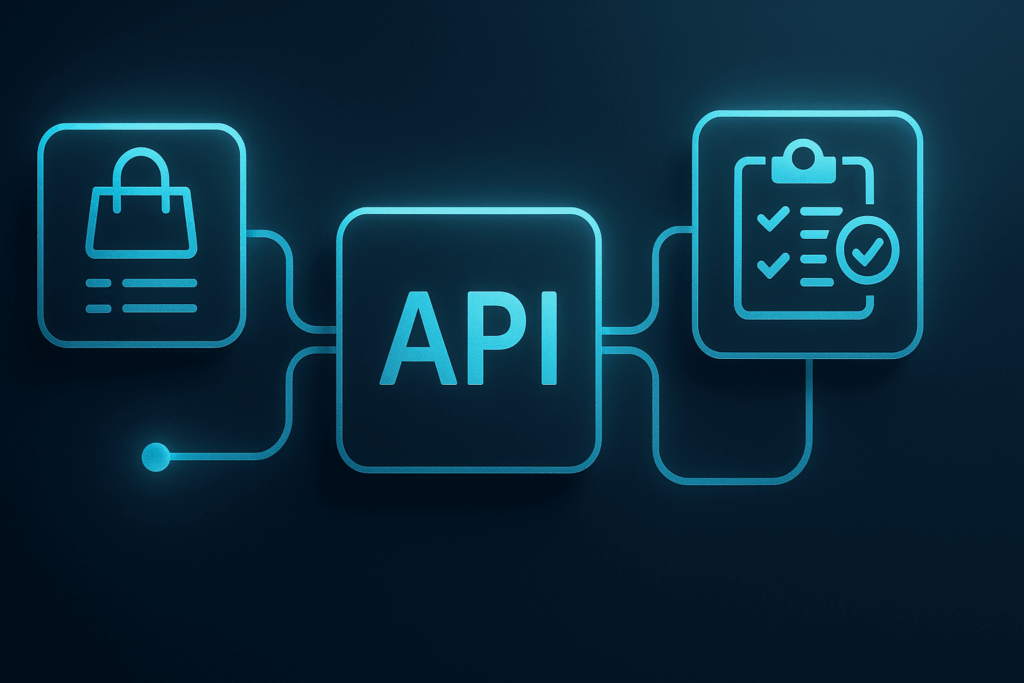
    The WhatsApp Business Platform offers a Cloud API that lets businesses communicate at scale. Unlike the free WhatsApp Business app on your phone, the API connects to your store, payment system, or customer database.

    This means automatic messages. When someone buys from you, the API can instantly send an order confirmation to their WhatsApp. No manual typing. No delays.

    API integration illustration showing connections between shopping, API, and checklist icons.

    Why Order Updates Matter More Than Marketing Messages

    Customers want to know where their orders are. They’ll check your website, call support, or email multiple times if they’re worried. Each inquiry costs you time and money.

    Order updates solve this before problems start. A simple “Your order #1234 shipped today” message stops most customer service calls. It also shows you care about their experience after they buy.

    Interactive messages that include buttons make this even better. Add a “Track Package” button that links directly to shipping details. Your customers get instant answers without contacting support.

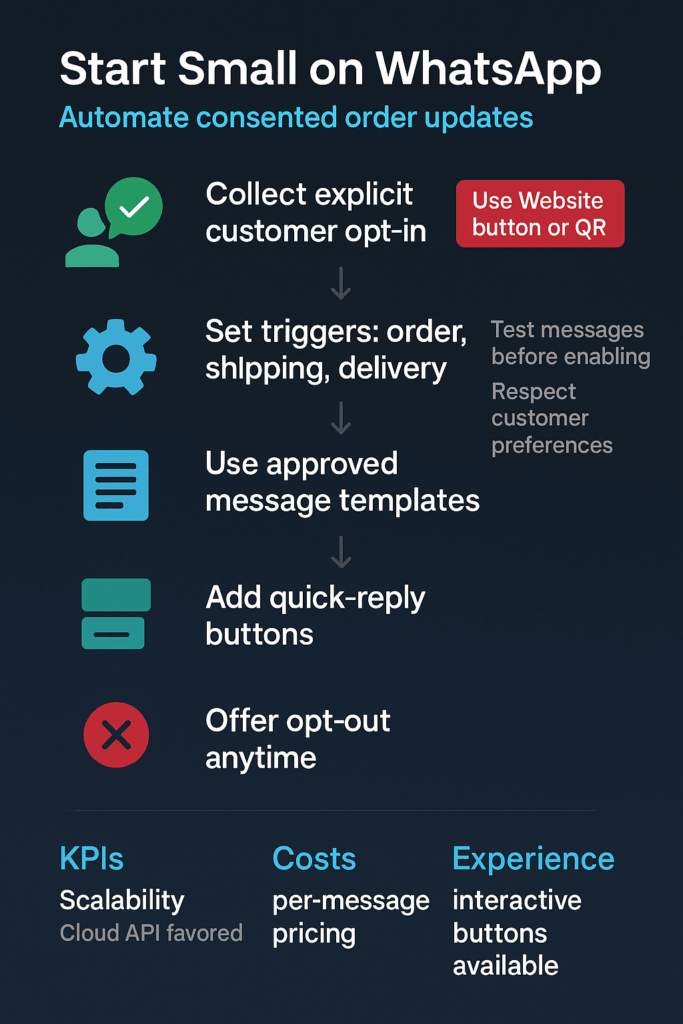
    Infographic showing WhatsApp order update steps: opt-in, triggers, templates, replies, opt-out.

    The timing matters too. Email confirmations often arrive in spam folders or get lost in crowded inboxes. WhatsApp messages appear immediately on the device your customers check most often.

    How to Start With Order Updates

    Pick one simple message type and do it well. Here’s how to approach your first automated WhatsApp message:

    • Get developer help early: You’ll need technical support to connect the API to your store or payment system. Plan for 4-8 hours of setup time to create a test account and send your first successful message.
    • Design your opt-in process: Create a clear checkbox on your checkout page asking customers if they want WhatsApp updates. The exact wording matters for legal compliance and customer trust.
    • Start with order confirmations: Focus on one message type first, like “Your order #1234 for $X is confirmed and will ship within 2 business days.” Keep it simple and useful.
    Chat bubble icon with a check mark, representing confirmed messages or updates.

    Test everything with your own phone number first. Send yourself order confirmations, shipping notices, and delivery updates. Make sure the messages feel helpful, not pushy.

    Signals Your WhatsApp Updates Are Working

    Watch these metrics to see if your automated messages improve customer experience:

    • Fewer “where’s my order” support tickets: Track how many customers contact support about order status after you start sending WhatsApp updates.
    • Higher opt-in rates over time: Monitor how many customers choose to receive WhatsApp messages during checkout. Low rates might mean unclear messaging or placement. If you need ideas, check out our guide on WhatsApp opt-in strategies to make the process smoother.
    • Message delivery rates: The API provides data on how many messages actually reach customers versus bounce or fail.
    • Customer satisfaction scores: Include brief surveys asking if WhatsApp updates helped customers feel informed about their orders. You can also boost engagement with WhatsApp auto-reply features to keep conversations flowing.
    • Repeat purchase behavior: Customers who feel well-informed about their first order often buy again sooner.
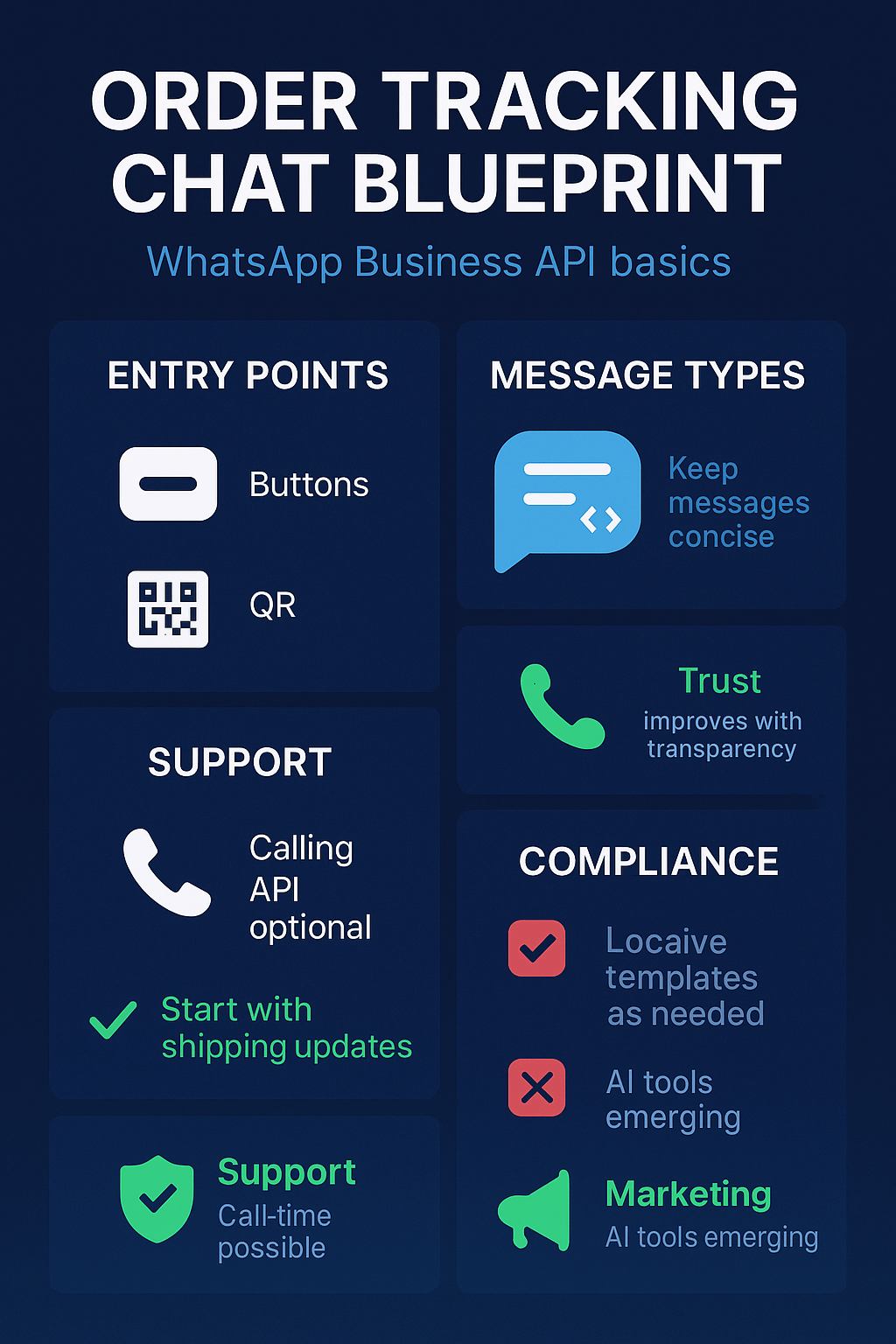
    Infographic blueprint for WhatsApp order tracking chat: entry points, support, compliance, trust.

    Don’t expect instant results. Give customers a few weeks to experience the new communication style before making major changes.

    Safeguards to Protect Your Business

    Permission comes first. You must get customer consent before sending any WhatsApp messages. Businesses using the platform are charged on a per-message basis, so sending unwanted messages costs money and damages relationships.

    Keep messages focused on service, not sales. Order updates work because customers expect and want them. Adding promotional content to these messages feels like spam and can lead to blocks or complaints.

    Set up human review for edge cases. Automated systems sometimes fail when orders get canceled, refunded, or shipped to different addresses. Have a process for handling unusual situations manually.

    Two shield icons, one with a check mark and one with a padlock, symbolizing security and trust.

    Why Acting Now Gives You an Edge

    Most businesses still rely on email for order communications. Customers have trained themselves to ignore or delete these messages. WhatsApp updates feel more personal and immediate.

    New AI-powered tools and optimizations for marketing messages are making the platform more capable. Early adopters who start with simple order updates can expand to more sophisticated communications as they learn what works.

    Your competitors will eventually discover this advantage. The businesses that build customer trust through better order communication today will be harder to catch later.

    Glowing server and smartphone icons connected by lines, representing digital communication flow.

    Start with one message type. Get customer permission. Send helpful updates. Your customers will notice the difference, and your support team will thank you for the quieter inbox.

    Sign up for ZendoWhisper free trial