Tag: Message

message examples help you write clear notes, emails, and posts you can trust and use fast. See tips on tone, examples for common cases, and simple steps to fix errors, so your message sounds kind, clear, and ready to send.

  • WhatsApp Consent Message Templates That Actually Work

    WhatsApp Consent Message Templates That Actually Work

    Your customers want to hear from you on WhatsApp. But send one message without proper consent and you risk account suspension. The fix is simple: add clear consent language to your forms before you start messaging.

    What WhatsApp Consent Really Means

    WhatsApp consent is permission from your customer to send them messages on the platform. You must get a user’s consent before you can message them on WhatsApp, according to platform policy. This isn’t just a checkbox somewhere on your site. The opt-in must clearly state your business name and that the person is agreeing to receive messages from you over WhatsApp.

    Think of it as a simple contract. Your customer says yes to getting specific types of messages from your specific company on WhatsApp.

    For a deeper breakdown of WhatsApp opt-in rules, privacy requirements, and message window limitations, see our WhatsApp privacy compliance guide.

    Glowing teal checkbox inside a dark chat bubble on graphite-blue gradient background

    Why This Matters More Than You Think

    Poor consent practices create three big problems for your business. First, Meta can suspend your WhatsApp Business account if they find you’re messaging people who didn’t clearly agree. Account recovery takes weeks and kills your momentum.

    Second, unclear consent hurts your message delivery rates. When people report your messages as spam because they forgot they signed up, WhatsApp’s algorithm notices. Your future messages get filtered out or blocked entirely.

    Third, you waste time and money on the wrong audience. People who didn’t intentionally opt in for WhatsApp messages rarely engage. They delete, ignore, or block you instead of buying.

    The solution costs nothing and takes minutes to implement.

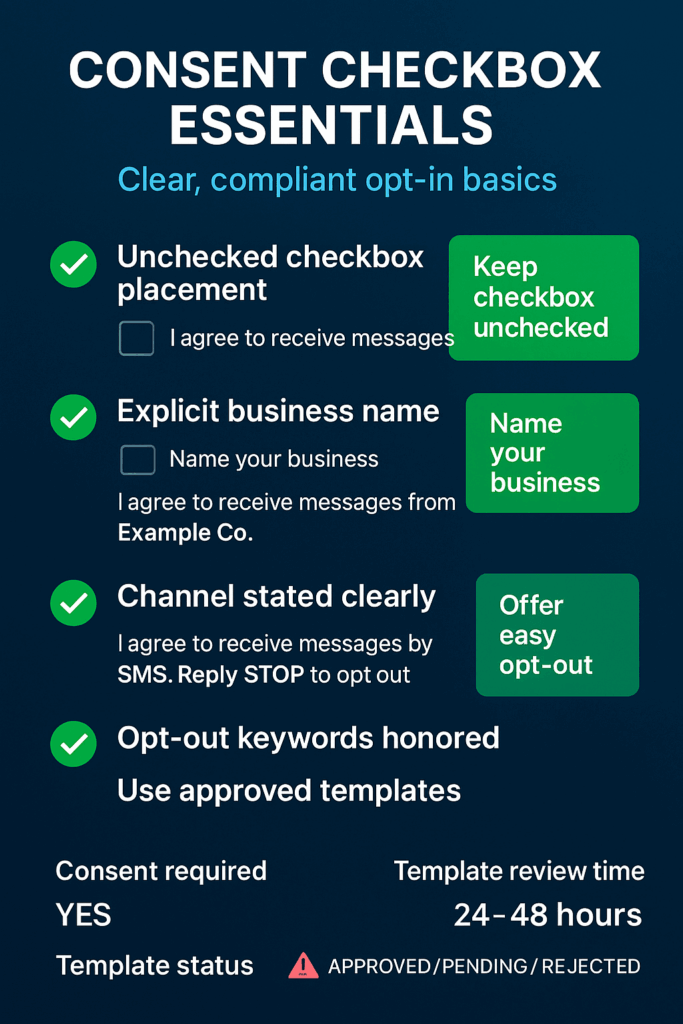
    Vertical infographic on consent checkboxes, clear opt-in rules, and template KPIs

    Your Three-Step Consent Setup

    Start with these practical steps to build compliant consent collection:

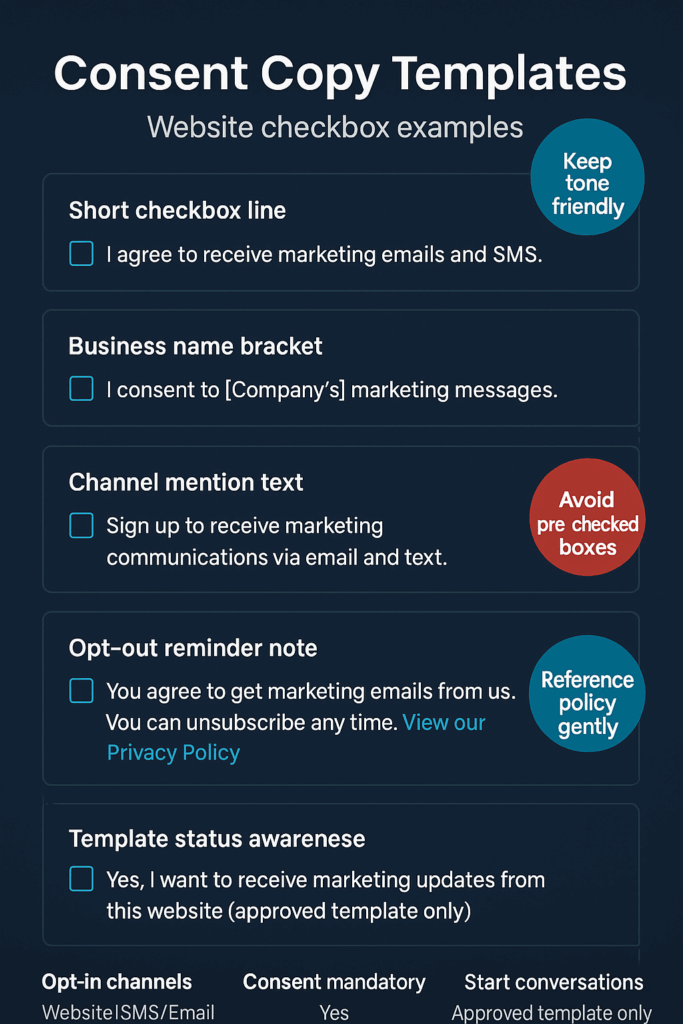
    • Add consent language to your highest-traffic form – Place an unchecked checkbox on your checkout page, contact form, or newsletter signup with text like “I agree to receive order updates and offers from [Your Company Name] on WhatsApp.” Make sure customers must actively check the box.
    • Create a simple opt-out process – Set up an automated response that handles common opt-out keywords like “STOP” or “UNSUBSCRIBE.” Businesses must honor user requests to opt out of receiving messages. Test this process before you send your first campaign.
    • Draft your first message template – Write a welcome message that reminds people they signed up and tells them what to expect. Businesses can only start conversations using an approved message template, so plan for Meta’s review process.
    Sleek navy UI mockup of opt-in controls with toggles, bar, fields and icons, no text

    Watch These Consent Health Signals

    Track these metrics to catch consent problems early:

    • Spam report rate – If more than 2% of your messages get marked as spam, review your consent collection process
    • Opt-out requests per campaign – A sudden spike means your consent language might be unclear or your content doesn’t match what people expected
    • Message delivery rates – Dropping delivery rates often signal that WhatsApp’s algorithm thinks you’re sending unwanted messages
    • Template approval timeMeta typically reviews and approves message templates within 24-48 hours. Longer delays might indicate content issues
    • Customer confusion responses – Messages like “Who is this?” or “I didn’t sign up” suggest your consent process needs work
    Infographic of website consent checkbox templates with tips for friendly, clear opt-ins

    Essential Consent Safeguards

    Double-check your business name – Your consent checkbox must use the exact business name that appears on your WhatsApp Business account. Mismatched names confuse customers and violate platform rules.

    Keep consent records – Document when and where each customer gave consent. Include the exact checkbox text they saw and the date they agreed. You’ll need this if customers complain or if Meta asks questions.

    Review consent language quarterly – WhatsApp’s rules can change. Check the official policy every few months to make sure your consent language stays compliant. You can also follow our WhatsApp privacy compliance checklist to make sure you don’t miss any important changes.

    Neon blue shield icon on dark inky gradient with subtle red alert dots glowing softly

    Why You Should Fix This Now

    Every day without proper consent collection is a missed opportunity and a growing risk. Your competitors are already building WhatsApp customer lists with clear consent processes. They’re getting higher engagement rates and stronger customer relationships because their audience actually wants to hear from them.

    Meanwhile, businesses that skip proper consent face account suspensions just when their WhatsApp strategy starts working. The fix takes less time than your next meeting and protects everything you build afterward.

    Glowing blue chat bubble with checkmark icon on dark gradient, symbolizing consent

    Start with one form on your website. Add clear consent language. Test the opt-out process. Your future campaigns will thank you for building the right foundation.

    Sign up for ZendoWhisper free trial

  • WhatsApp Greeting Message Examples That Work

    WhatsApp Greeting Message Examples That Work

    Your customer sends a message at 9 PM. Your team is offline. Without an automated greeting, they wonder if you even got their message. A simple welcome message fixes this instantly and keeps customers happy while they wait.

    What Is a WhatsApp Greeting Message?

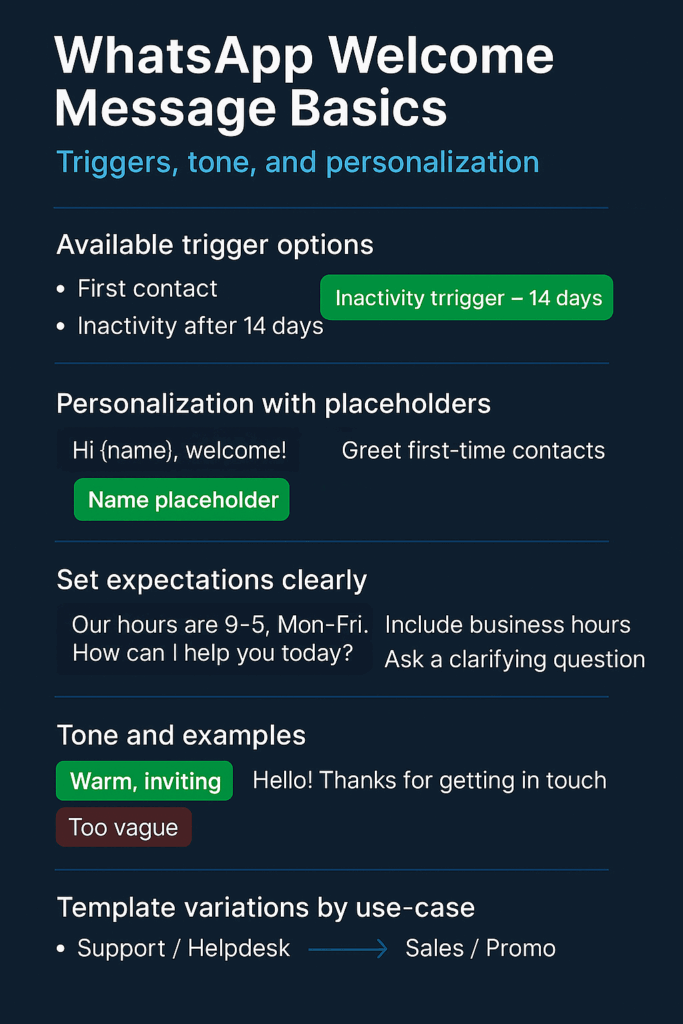
    A greeting message is an automated reply that goes out when someone contacts your business for the first time. According to zixflow.com, these messages trigger when a customer messages you for the first time or after 14 days of inactivity. Think of it as your digital receptionist that never sleeps. If you’re brand new to automation, start with our primer: WhatsApp Automation 101.

    Start with a friendly greeting.

    Why This Matters for Your Business

    Customers expect fast responses. When they don’t get one, they often assume you’re ignoring them or wonder if their message went through. An automated greeting solves this problem immediately.

    For SMB owners juggling multiple tasks, greeting messages buy you time. Your customers know you received their message and when to expect a real reply. Support teams can focus on complex issues instead of typing “Got your message, we’ll be right with you” dozens of times per day.

    Marketing teams benefit too. Every greeting is a chance to make a good first impression and guide customers toward the right action. As noted by trengo.com, message templates can be customized by customer segment and can include placeholders for personalization, such as the customer’s name.

    WhatsApp welcome message basics: triggers, personalization, hours, tone, and template variations.

    How to Start With Greeting Messages

    Pick one basic template first. Start with something simple like: “Hi! Thanks for contacting us. We’ll get back to you within 2 hours during business hours (9 AM – 6 PM, Monday-Friday).” Keep it short and clear.

    Set it up in your WhatsApp Business app. Go to Settings, then Business tools, then Greeting message. Turn it on and paste your text. Test it by having someone message your business number from a different phone. Want to go beyond a basic greeting with FAQs and quick replies? See our guide to WhatsApp Auto-Reply.

    Include your response time and hours. Customers need to know when they’ll hear back. Be realistic about your team’s capacity. It’s better to promise 4 hours and deliver in 2 than promise 30 minutes and take 3 hours.

    Shield with speech-bubble—safe, trustworthy messaging.

    Signals Your Greeting Message Is Working

    Fewer “Did you get my message?” follow-ups. When customers stop asking if you received their original message, your greeting is doing its job.

    Customers mention specific details from your greeting. If they reference your business hours or ask about services you mentioned in the welcome message, they’re reading it.

    Less confusion about next steps. Track how often customers ask “What should I do now?” A good greeting guides them forward.

    Team reports fewer basic questions. Your support staff should handle fewer messages asking about hours, location, or whether you’re still in business.

    Higher satisfaction in follow-up conversations. Customers who get immediate acknowledgment tend to be more patient and positive in subsequent exchanges.

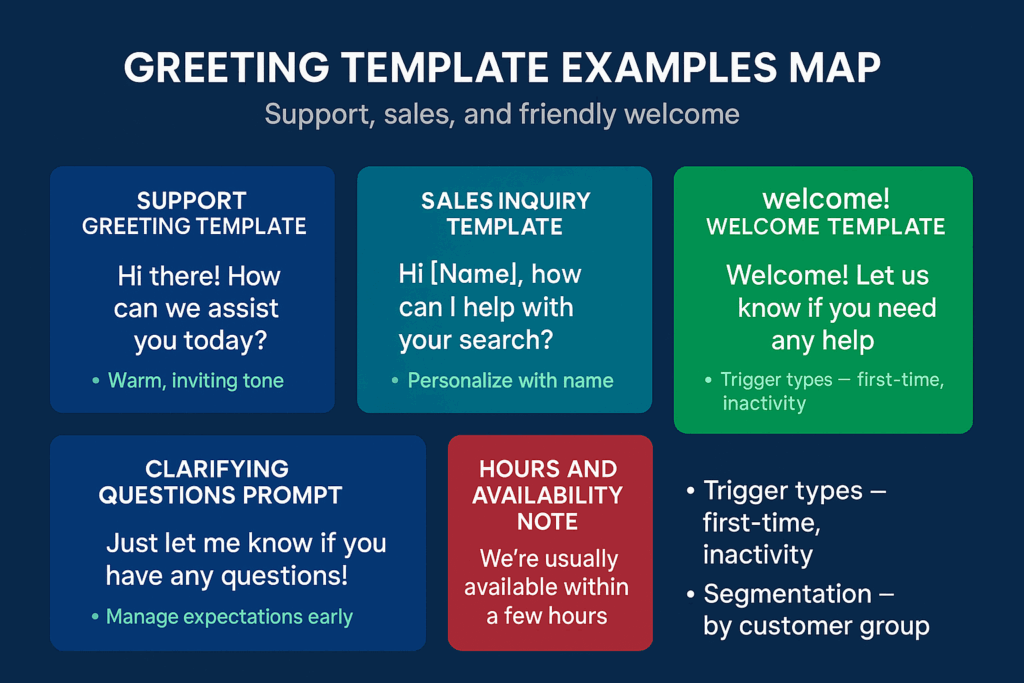
    Greeting template examples: support, sales, welcome, clarifying questions, and availability.

    Keep These Safeguards in Mind

    Make sure your team actually responds within the timeframe you promise. An automated greeting that says “We’ll reply in 2 hours” followed by radio silence for 8 hours creates more frustration than no greeting at all.

    If you use personalization like customer names, verify your system has that data. A message starting with “Hi [Name]” because the name field is empty looks unprofessional and broken.

    Remember that automated messages aren’t conversations. Keep your greeting helpful but brief. Save the detailed explanations for when a real person takes over.

    Chat bubbles with a checkmark—clear, approved customer replies.

    Ready-to-Use Greeting Templates

    For general customer service:
    “Hi there! Thanks for reaching out. We’ve received your message and will respond within 4 business hours. Our team is available Monday-Friday, 8 AM – 6 PM EST.”

    For sales inquiries:
    “Hello! Excited to help you learn more about our services. A team member will contact you within 2 business hours to discuss your needs. Business hours: Mon-Fri 9 AM – 5 PM.”

    For after-hours messages:
    “Thanks for your message! Our office is currently closed. We’ll get back to you first thing tomorrow morning. For urgent matters, please call [phone number].”

    For appointment-based businesses:
    “Hi! To schedule an appointment, please let us know your preferred date and time. We’ll confirm availability within 3 hours during business hours (Tue-Sat, 10 AM – 7 PM).”

    Why Act on This Now

    Every day without a greeting message is another day customers wonder if you’re professional and responsive. Your competitors who reply instantly (even with automation) look more reliable and organized.

    Setting up one basic greeting takes 5 minutes but works around the clock. Start with a simple template today, then refine it based on the responses you get. Your customers will appreciate the immediate acknowledgment, and your team will appreciate fewer basic questions.

    Sign up for ZendoWhisper free trial